
Part 4: Storage - SSDs and HDDs
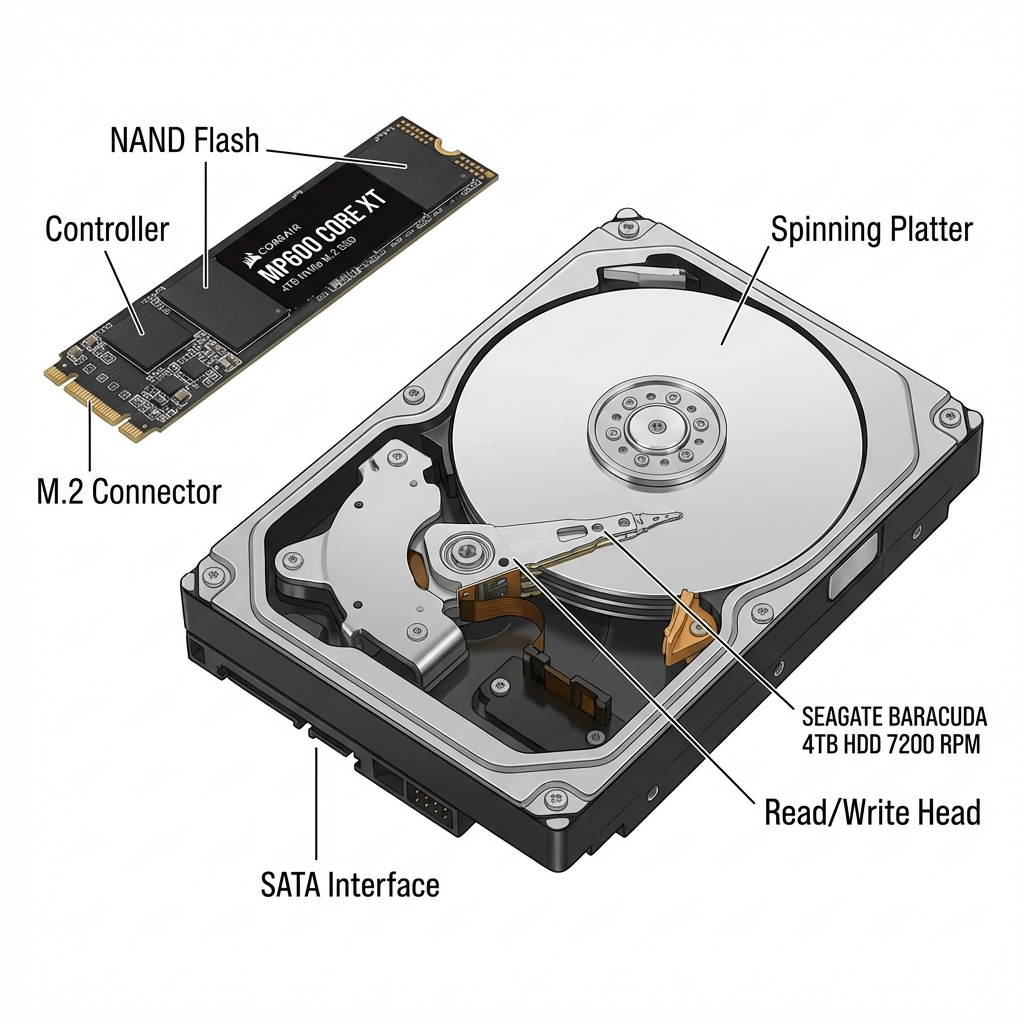
Storage is where all your files live permanently - your operating system, programs, games, photos, and documents.
Understanding the difference between SSDs and HDDs will help you build a faster, better PC.
SSD vs HDD: What's the Difference?
HDD (Hard Disk Drive):
- Uses spinning metal platters
- Slow (takes time to find and load files)
- Cheap ($15-20 per TB)
- Good for: Bulk storage, backups
- Loud, fragile (moving parts)
SSD (Solid State Drive):
- No moving parts (like a giant USB drive)
- FAST (10-100x faster than HDD!)
- More expensive ($50-80 per TB)
- Silent, durable
- Good for: Everything!
Rule #1: Always use an SSD for your operating system (Windows) Rule #2: SSDs for programs and games you play often Rule #3: HDD for bulk storage if you need lots of space cheap
Types of SSDs
- M.2 NVMe SSD (Modern, Fast):
- Looks like a stick of gum
- Plugs directly into motherboard
- No cables needed!
- Please choose this one!
- 2.5" SATA SSD (Older, Slower):
- Looks like small flat box
- Needs cables
- Speed: 550 MB/s (still way faster than HDD)
- Good for older PCs
For new builds: Always choose M.2 NVMe
How Much Storage Do You Need?
Consider what you'll store:
500GB: Minimum
- Windows + programs + 3-5 games
- Tight but workable
1TB: Sweet Spot (Recommended)
- Windows + programs + 8-10 games
- Comfortable for most people
- Our recommendation ↓
2TB: Plenty of Room
- Large game library
- Content creation files
- Future-proof
Modern game sizes for reference:
- Call of Duty: 150-200GB (huge!)
- Cyberpunk 2077: 70GB
- Fortnite: 30GB
- Indie games: 1-20GB
Our Recommendation
For fast, reliable storage:
WD Black SN850X 1TB NVMe SSD Check Price on Amazon
Why we love it:
- 1TB capacity (perfect size)
- 7,300 MB/s read speed (very fast!)
- Reliable WD quality
- 5-year warranty
- Great for OS, programs, and games
- Price: ~$90-110
This drive makes your whole PC feel snappy and responsive.
Storage Strategy
Best setup for most people:
Option 1 (Simple):
- 1TB NVMe SSD for everything
- Clean, fast, easy
Option 2 (More Storage):
- 1TB NVMe SSD (OS, programs, favorite games)
- 2TB HDD (bulk storage, older games, media)
- Good balance of speed and capacity
Start with Option 1. Add HDD later if you need more space!
Common Mistakes
- ❌ Installing Windows on HDD - Everything will be slow!
- ❌ Filling SSD to 100% - Slows it down, leave 10-20% free
- ❌ Defragmenting SSD - Never do this, it wears out the drive
- ❌ Not checking M.2 slots - Make sure your motherboard has one
Summary
- Always use SSD for Windows (never HDD!)
- M.2 NVMe is fastest and easiest (no cables)
- 1TB is the sweet spot for most people
- WD Black SN850X offers great performance
- Can add more storage anytime
Next: Part 5 - Cases and Cooling →
Links in this guide are affiliate links that support our content creation.