
Part 1: Motherboards - The Foundation
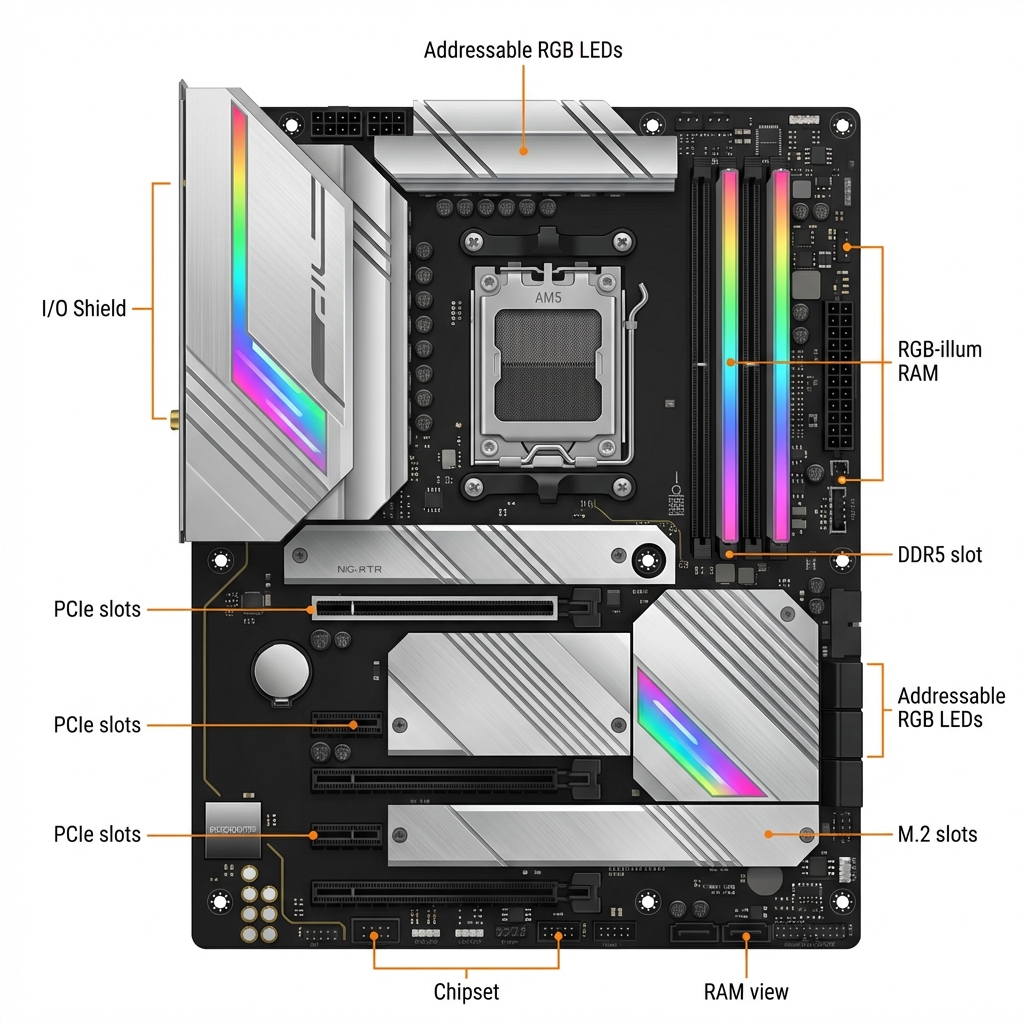
The motherboard is the foundation of your PC. It's the large circuit board that everything connects to - your CPU, RAM, graphics card, and storage drives.
Most importantly: The motherboard determines what other components you can use. It dictates which CPU fits, what type of RAM you need, and how many drives you can connect.
Let's break down what you need to know.
What Does It Do?
The motherboard doesn't make your computer faster - it's not a performance part. Instead, it:
- Holds your CPU and provides power to it
- Has slots for your RAM sticks
- Offers slots for your graphics card
- Connects your storage drives
- Provides USB ports, audio, and network connections
Think of it as the foundation of a house - it determines what you can build on top.
Motherboard Sizes
Motherboards come in three main sizes:
ATX (Standard Size - 12" x 9.6")
- 4 RAM slots, 3-4 PCIe slots
- Most expansion options
- Best for: Most builds
Micro-ATX (Smaller - 9.6" x 9.6")
- 4 RAM slots, 2-3 PCIe slots
- Cheaper than ATX
- Best for: Budget builds, smaller cases
Mini-ITX (Tiny - 6.7" x 6.7")
- 2 RAM slots, 1 PCIe slot
- Limited expansion, harder to build
- Best for: Small form factor builds (not recommended for beginners)
For your first build: Choose ATX or Micro-ATX
Chipsets: Intel vs AMD
The chipset determines what features your motherboard has. You must match the chipset brand to your CPU brand.
For Intel CPUs (12th/13th/14th gen):
- B760 - Best for most people ($120-200)
- Z790 - For overclocking enthusiasts ($200-400)
For AMD Ryzen CPUs (7000 series):
- B650 - Best for most people ($120-200)
- X670 - For enthusiasts ($200-400)
The B-series chipsets give you everything you need for gaming and productivity!
Key Features to Check
When choosing a motherboard, verify:
- ✓ CPU Socket: Must match your CPU
- Intel 12th/13th/14th gen = LGA 1700
- AMD Ryzen 7000 = AM5
- ✓ RAM Type: DDR4 or DDR5 (must match your RAM)
- DDR5 is newer and faster but more expensive
- They're NOT interchangeable!
- ✓ RAM Slots: 4 slots is standard (good for upgrades)
- ✓ M.2 Slots: For fast NVMe SSDs (2-3 slots is plenty)
- ✓ WiFi: Check if you need it (Boards with "WiFi" in name have it built-in)
- ✓ USB Ports: Make sure there are enough on the back
Our Recommendation
For most builders, we recommend:
MSI B650 TOMAHAWK WIFI Check Price on Amazon
Why we love it:
- Works with AMD Ryzen 7000 CPUs (AM5 socket)
- Supports DDR5 RAM
- Built-in WiFi 6E and Bluetooth
- 4 RAM slots, 3 M.2 slots
- Strong power delivery for your CPU
- Great quality for the price (~$200)
This board gives you everything you need for a solid gaming or productivity PC.
Common Mistakes to Avoid
- ❌ Buying wrong socket - CPU socket must match motherboard
- ❌ Mixing DDR4/DDR5 - Your motherboard only supports one type
- ❌ Forgetting WiFi - Make sure board has it if you need it
- ❌ Wrong size for case - ATX board won't fit Micro-ATX case
Use PCPartPicker!
Always verify compatibility on PCPartPicker.com:
- Add your motherboard
- Add your CPU - site shows if they're compatible
- Add RAM - site shows only compatible types
- It catches 90% of compatibility issues automatically!
Summary
- Motherboard determines compatibility
- B650 chipset is great for AMD Ryzen builds
- Check socket type, RAM type, and features
- Our pick: MSI B650 TOMAHAWK WIFI
Links in this guide are affiliate links that support our content creation.