
If you are building your first PC, CPUs and GPUs are two of the parts you will hear about most. They do very different jobs, and understanding the difference helps you spend your budget in the right places.
The Simple Explanation
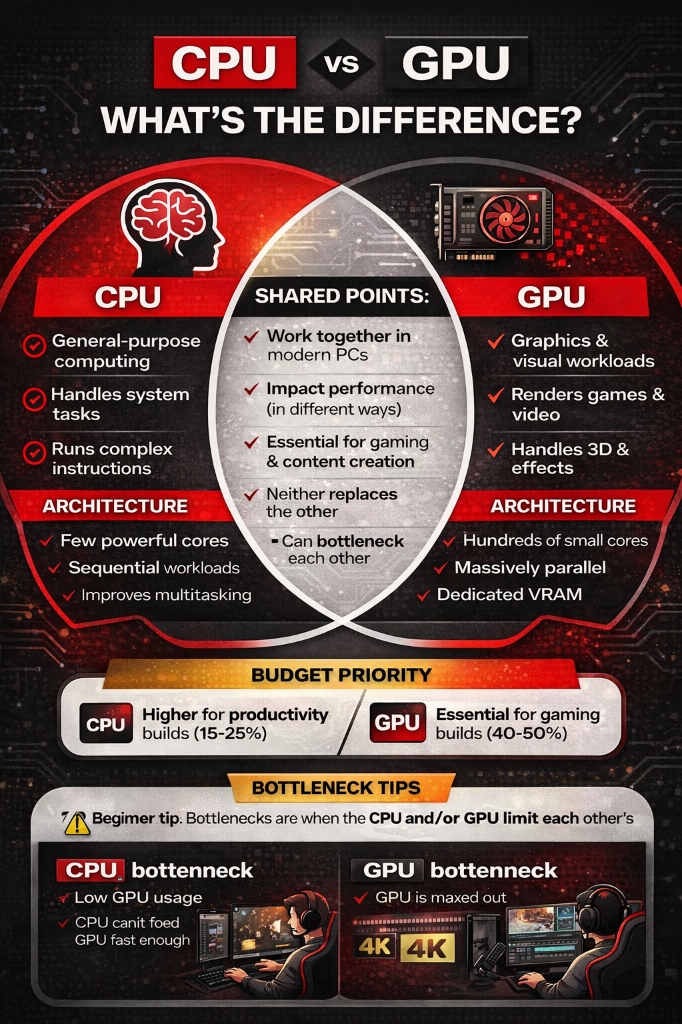
CPU (Central Processing Unit): Think of this as your computer's brain. It handles all the general thinking, decision-making, and coordination. When you open a program, browse the web, or run calculations, your CPU is doing the work.
GPU (Graphics Processing Unit): Think of this as your computer's art studio and muscle power combined. It's specialized for handling graphics and doing tons of simple calculations all at once. Gaming, video editing, and anything visual relies heavily on your GPU.
What Does a CPU Do?
Your CPU is the general-purpose workhorse of your computer. It handles tasks like running your operating system, opening programs, processing your inputs, managing files, and running game logic like AI and physics calculations.
The CPU is like a really smart assistant who can do almost any task you throw at them, but they work on things one at a time (or a few things at a time with multiple cores).
Here is a concrete example. When you click a link in your browser, the CPU is doing the work of figuring out what you clicked, sending the network request, interpreting the HTML that comes back, running any JavaScript on the page, and coordinating with your operating system to put all of that on screen. It is juggling a dozen different kinds of tasks, making decisions at each step, and it needs to be smart about all of them. That is why CPU cores are designed to be fast and flexible rather than numerous.
Cores and Threads
Modern CPUs have multiple "cores" – think of each core as a separate worker. A 6-core CPU has 6 workers handling different tasks simultaneously. Many CPUs also support "multi-threading," allowing each core to work on two tasks at once.
Common Core Counts:
- 4 cores: Entry-level, fine for basic tasks
- 6 cores: Sweet spot for gaming
- 8 cores: Great for gaming and productivity
- 12+ cores: Content creation, streaming, professional work
CPU Speed
CPU speed is measured in gigahertz (GHz). A 3.5 GHz CPU performs 3.5 billion cycles per second. Higher numbers generally mean faster performance, though architecture improvements matter just as much as raw speed.
What Does a GPU Do?
Your GPU is a specialist designed for graphics and parallel processing. GPUs excel at rendering video game graphics, video editing, 3D modeling, photo editing, and running multiple monitors.
The GPU is like having thousands of simple workers who aren't as versatile as the CPU, but when you need to do the same type of task over and over (like rendering millions of pixels), they're incredibly powerful.
How GPUs Work
While CPUs have a few powerful cores (usually 4-16), GPUs have hundreds or thousands of smaller, specialized cores. A modern gaming GPU might have 3,000+ cores working together to render your games.
To make this concrete: imagine you need to paint a mural on a wall. A CPU is like hiring four world-class artists. Each one is incredible — they can paint faces, landscapes, abstract art, whatever you ask. But there are only four of them. A GPU is like hiring 3,000 people who each know how to paint exactly one pixel at a time. Individually, they are not versatile. But when you need to fill an entire wall with color simultaneously, 3,000 simple painters working in parallel absolutely crush four talented painters working sequentially. That is the fundamental difference in how these chips are designed.
VRAM (Video Memory)
GPUs have their own dedicated memory called VRAM where they store textures and graphics data.
Common VRAM Amounts:
- 6GB: Entry-level gaming at 1080p
- 8GB: Solid for 1080p and 1440p gaming
- 12GB+: High-end gaming, 4K, content creation
How They Work Together
Your CPU and GPU work as a team. One can't replace the other.
In a video game: The CPU handles game logic (where enemies are, what happens when you press a button), while the GPU renders everything on screen (the environment, lighting, textures).
In video editing: The CPU handles timeline management and encoding, while the GPU accelerates rendering and effects.
Which One Matters More?
The answer depends on what you're doing.
For Gaming
GPU matters more. Your graphics card determines your frame rates and visual quality. A strong GPU with a mid-range CPU gives better gaming performance than a top-tier CPU with a weak GPU.
That said, you can't ignore your CPU. If it's too weak, it creates a "bottleneck" where the CPU can't keep up with the GPU, limiting performance.
Gaming Sweet Spot: Mid-range CPU (AMD Ryzen 5 or Intel Core i5) + strong GPU
For Content Creation
Both matter a lot. Video editing and 3D rendering use both heavily. Many programs use GPU acceleration, but the CPU still handles encoding and effects.
For Streaming While Gaming
CPU matters more than you'd think. Streaming software uses your CPU to encode your stream. You need a CPU with extra cores, or a modern GPU with dedicated encoding hardware (like NVIDIA's NVENC).
For General Use
CPU matters more. Web browsing, office work, and streaming videos don't need a powerful GPU. Most modern CPUs have integrated graphics that handle these tasks fine.
Understanding Bottlenecks
A "bottleneck" happens when one component holds back another. Think of a water bottle – water can only flow as fast as the neck allows.
CPU Bottleneck: Your CPU can't feed information to your GPU fast enough. Signs include low GPU usage (60-70%) and CPU usage at 100%.
GPU Bottleneck: Your GPU can't keep up with the CPU's demands. This is actually ideal for gaming -- it means you're getting maximum performance from your graphics card. Signs include GPU at 95-100% usage.
A practical way to check for bottlenecks is to open Task Manager on Windows (or a monitoring tool like MSI Afterburner) while playing a game. If your CPU is at 100% and your GPU is sitting at 60%, the CPU is the limiting factor. If the GPU is at 99% and the CPU is comfortably below that, your system is well balanced. This is one of the most useful things to check before deciding whether to upgrade your CPU or GPU next.
Building Your First PC: Budget Allocation
Here's how to split your budget:
Gaming Focused PC:
- GPU: 40-50% of budget
- CPU: 15-25% of budget
Balanced PC (Gaming + Productivity):
- GPU: 30-35% of budget
- CPU: 20-30% of budget
Common Beginner Mistakes
Mistake 1: "I got the best CPU, so I can skimp on the GPU" For gaming, this is backwards. A $200 CPU with a $400 GPU beats a $400 CPU with a $200 GPU every time.
Mistake 2: "More cores is always better" Not for gaming. A 6-core CPU with higher speeds often beats a 12-core CPU with lower speeds. More cores help with multitasking and productivity.
Mistake 3: "I need the newest generation" Last-generation parts often offer incredible value. A previous-gen high-end part can beat a current-gen mid-range part for similar money.
Real-World Examples
Budget Gaming Build ($700-800)
- CPU: AMD Ryzen 5 5600 or Intel Core i5-12400F
- GPU: NVIDIA RTX 4060 or AMD RX 7600
- Result: Solid 1080p gaming at high settings
Mid-Range Gaming Build ($1200-1400)
- CPU: AMD Ryzen 5 7600X or Intel Core i5-13600K
- GPU: NVIDIA RTX 4070 or AMD RX 7800 XT
- Result: Excellent 1440p gaming
High-End Gaming Build ($2000+)
- CPU: AMD Ryzen 7 7800X3D or Intel Core i7-14700K
- GPU: NVIDIA RTX 4080 or AMD RX 7900 XTX
- Result: Maximum performance at 1440p and 4K
Notice how even in high-end builds, the GPU gets priority while the CPU is very good (but not necessarily the absolute best).
What about integrated graphics?
This is worth covering because it confuses a lot of first-time builders.
Some CPUs come with built-in graphics capabilities. Intel calls these "integrated graphics" (like Intel UHD or Intel Iris Xe). AMD has APUs, which are CPUs with Radeon graphics built in. These integrated solutions can handle basic tasks perfectly well — web browsing, video streaming, office work, and even some light gaming at lower settings.
If you are building a PC that will never touch serious gaming or video editing, you might not need a dedicated GPU at all. That saves you a significant chunk of your budget. However, if you plan to game at any meaningful quality level, integrated graphics will not cut it. They share system memory instead of having dedicated VRAM, and they have far fewer processing cores than even a budget dedicated GPU.
The practical takeaway: if you are unsure whether you need a GPU, start with a CPU that has integrated graphics. You can always add a dedicated GPU later. But if you know you want to game, budget for a real GPU from the start.
Honest take
The CPU vs GPU distinction matters most when you are spending money. Outside of buying decisions, you do not need to think about it much. Your computer handles the coordination between them automatically.
Where people get into trouble is when they read benchmark charts and spec sheets without connecting those numbers to what they actually do with their computer. A person who plays competitive multiplayer games at 1080p has very different needs than someone who edits 4K video for a living, even if both of them are spending the same amount of money. The specs only matter in the context of your real workload.
The other thing worth saying: do not let anyone make you feel stupid for not knowing this stuff. The CPU and GPU distinction is genuinely confusing when you first encounter it. The entire PC hardware industry loves to throw jargon around and assume everyone already knows what "CUDA cores" or "cache latency" means. You do not need to understand every detail. You need to understand enough to make a reasonable buying decision. That is all this article is trying to give you.
What to do next
If you are planning a build, here is a practical sequence:
- Decide what you will primarily use the PC for. Gaming, productivity, content creation, or general use.
- Set your total budget.
- Use the budget allocation percentages above to figure out roughly how much to spend on CPU vs GPU.
- Pick your GPU first if gaming is the priority. Pick your CPU first if productivity is the priority.
- Make sure they are balanced well enough that neither one bottlenecks the other badly.
- Do not obsess over getting the absolute best parts. A well-balanced mid-range build will outperform a lopsided build that overspends on one component.
Bottom Line
For most first-time PC builders, understanding this simple rule will save you money and frustration: If you're gaming, prioritize your GPU budget. If you're doing productivity work, balance both.
The CPU is your computer's brain handling all the thinking, while the GPU is the muscle that makes your games and graphics look amazing. Both are essential, but knowing which one to prioritize for your needs makes all the difference.
Ready to choose your components? Check out our CPU and GPU buying guides for specific recommendations at every budget level!